-
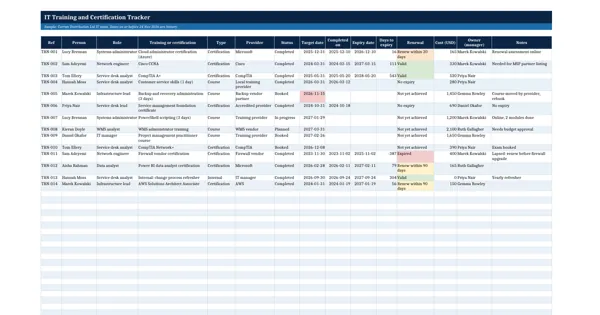 Excel workbook preview
IT Team, Roles, Skills and Policies
IT Training and Certification Tracker
3 downloads per free account, no card needed.
Who this is for
An IT manager whose MSP partner status or customer contract needs named certified staff, and who found a certification had lapsed only when asked for proof.
What is inside
- 14 sample courses and certifications for 8 people
- Days to expiry and renewal status calculate from the expiry date
- Expired turns red, renewal within 30 days amber, overdue targets red
- Spend per person and remaining training budget on the Summary sheet
- Counts of expired and soon-to-expire certifications
- Bar chart of spend per person, 24 blank rows with dropdowns
How to use it: Enter your training budget on the Summary sheet, replace the sample records with your own and record every expiry date the provider gives you.
Files & formats
- XLSXit-training-and-certification-tracker.xlsx15 KB
Opens in Microsoft Word or Excel, Google Docs or Sheets and LibreOffice. Delivered instantly from your browser.
Free downloads & full access
Every account gets 3 free downloads. Re-downloading a template you already have does not count. This template on its own is $17.99, and buying it keeps your free downloads for something else. Full access is a one-time $249 for all 300 templates, for life.
Bought with a different email? Open your account and enter your order number.
Licence
Use and adapt the document inside your own organisation or for your own clients. Do not resell or republish the templates themselves.
More in IT Team, Roles, Skills and Policies
IT Team, Roles, Skills and Policies
IT Interview Scorecard Form (with technical questions)
IT Team, Roles, Skills and Policies
New IT Manager 30-60-90 Day Plan
IT Team, Roles, Skills and Policies
IT Team Meeting Agenda and Minutes Template
IT Team, Roles, Skills and Policies